
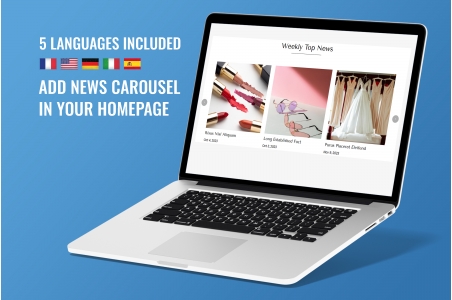


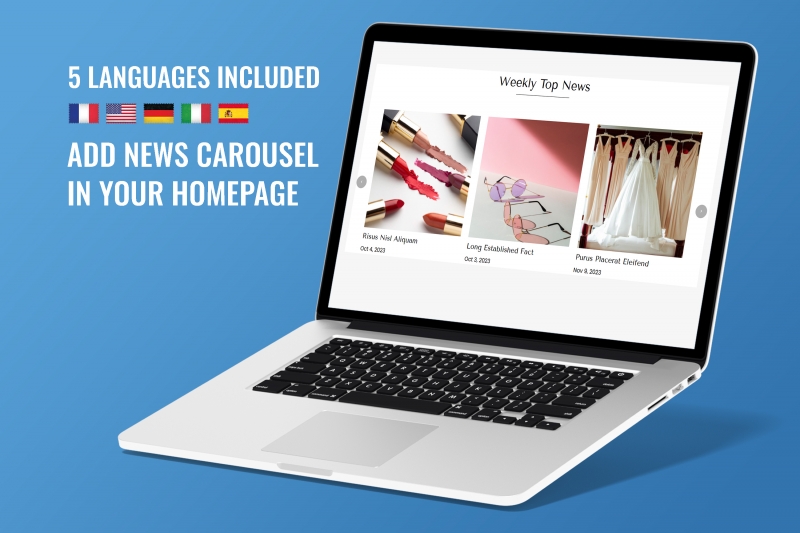
Keep your visitors informed about promotions/news!
Compatible with Prestashop versions 1.7 to 9
It is translated (included) in 5 languages: FR+DE+EN+IT+ES
Installation steps are described in 5 languages in the module's user manual provided upon purchase.
Demo : https://demo-web2007.com/demo-module/cookies/en/
Video : https://www.youtube.com/watch?v=BG352qbglJk

The PrestaShop Homepage News Carousel module is primarily aimed at online stores looking to boost their communication and strengthen their brand image. E-commerce businesses that regularly publish articles, new products, guides, promotions, or event announcements benefit the most. Thanks to the rotating visual display, visitors can instantly discover the latest information without having to navigate the entire site, thus improving retention and the overall user experience.
This module is also very useful for brands looking to improve their SEO. Highlighting structured news enhances the freshness of homepage content, a key ranking factor for Google. Stores can display sales stories, tips, product launches, or blog articles, allowing them to increase internal traffic and guide visitors to key pages on their website. Therefore, the module benefits any business aiming for visibility, dynamism, and marketing performance.
A PrestaShop News Carousel module is a tool that allows you to display news items as animated slideshows directly on the homepage. Each slideshow can contain a title, a short text, an image, and a link to the full article. This dynamic presentation attracts visitors' attention, making the content more visible than a simple static list. The carousel offers a modern and professional presentation, suitable for all types of online stores.
In addition to enhancing the homepage, this module plays a strategic role in communication and marketing. It directs visitors to valuable content, such as new products, features, promotions, or buying guides. By improving the site's internal structure and making content more dynamic, the carousel helps retain visitors, increase clicks, and boost the site's overall SEO performance. It is therefore a major asset for any online store looking to stand out.
The best location to install a News Carousel module on PrestaShop is at the top of the homepage, often just below the main banner or promotional slider. This strategic position ensures that every visitor immediately sees important news upon arrival on the site. The more visible the information, the more interaction and clicks it generates, which enhances the user experience and boosts the value of the published editorial or commercial content.
However, the carousel can also be placed in a sidebar or in the middle of the page, depending on the theme's structure. Some PrestaShop themes offer specific hooks for even more user-friendly display. The key is to choose a natural, fluid, and consistent location that aligns with the site's design so that visitors perceive the news as a central element of the store. Good placement increases engagement, improves internal navigation, and maximizes marketing performance.
The Carousel News module is particularly effective during strategic periods: sales, holidays, end-of-year celebrations, collection launches, or limited-time promotions. These periods generate high traffic and strong purchase intent, making the dynamic display of news extremely effective. The visual animations quickly capture attention and encourage visitors to explore the pages featuring promotions or new products.
Outside of peak seasons, using a carousel is also beneficial for product launches, marketing campaigns, important blog posts, or corporate announcements. This module allows for continuous communication and keeps your website active and engaging. Regardless of the time of year, regularly displaying new slides reinforces the perception of professionalism and improves SEO by constantly updating the homepage content.
Configuring a News Carousel module on PrestaShop involves defining the images, titles, short texts, and links to the full news pages. It's important to adhere to the recommended image sizes to ensure smooth display without distortion or slow loading times. A good module also offers options for animation speed, transitions, and the number of visible slides, allowing you to tailor the experience to your store's needs.
To ensure optimal display on mobile devices, it's essential to enable the module's "responsive" options. This allows the slides to adapt to all screen resolutions and remain legible even on small screens. Optimizing image file sizes is also recommended for faster loading times. A well-thought-out configuration makes the carousel perform well, improves SEO, and contributes to a consistent and enjoyable user experience.
The cost of a News Carousel module typically ranges from €59 to €99 depending on its complexity, options, and compatibility with PrestaShop 1.7 or 8.x. Some premium modules offer advanced features such as professional transitions, multi-slide management, video integration, or AMP compatibility, which can increase the price. Free modules also exist, but they often offer limited functionality or minimal technical support.
Regarding integration by a PrestaShop developer, the price can vary between €50 and €250 depending on the theme and customizations requested. A simple installation takes little time, but adapting the design, hooks, or animations may require more in-depth work. Investing in a good module is worthwhile, as it improves content visibility, strengthens marketing efforts, and significantly enhances the homepage.
Adding a News Carousel module improves SEO because it highlights fresh content directly on the homepage, one of the most important areas for search engine ranking. Google values regularly updated sites, and displaying news, new products, or recent articles increases the store's relevance. The carousel also generates internal links to strategic pages, which strengthens the site's SEO structure.
Furthermore, a well-configured carousel increases time spent on the site, a positive indicator for search engines. Visitors discover more content, click more, and engage more deeply in the navigation. Thanks to improved interaction, the bounce rate decreases. All of these signals contribute to improving the store's overall ranking in Google and attracting more qualified traffic.
Ideally, updating the News Carousel module should be handled by a marketing manager or site administrator with a basic understanding of PrestaShop. The update involves adding new slides, replacing old ones, and publishing relevant news items. This doesn't require advanced technical skills, as most modules offer an intuitive interface for easily editing each slide.
However, for online stores with a large volume of content or high graphic requirements, it can be beneficial to entrust management to a webmaster or a PrestaShop agency. This ensures a professional presentation, visual consistency, and adherence to SEO best practices. Regular carousel management keeps the site dynamic, engaging, and high-performing, while also enhancing the store's credibility with visitors.
News Carousel modules compatible with PrestaShop 1.7 and 8.x can be found on the official PrestaShop Addons marketplace, which offers a wide selection of certified extensions. They can also be found on alternative platforms such as CodeCanyon, ThemeForest, or websites specializing in PrestaShop modules developed by agencies. These platforms allow you to compare features, updates, and support quality.
Some independent developers also offer custom modules on GitHub or through their professional websites. Choosing a trusted source is essential to ensure the module's compatibility, security, and stability. It's advisable to check reviews, supported versions, and update frequency before purchasing. A good module ensures smooth operation, easy integration, and optimal performance on all versions of PrestaShop.
To choose the best News Carousel module, you need to analyze your store's needs: news type, volume, desired design, and animation options. A high-performing module should offer a responsive display, easy slide management, smooth transitions, and the ability to add images, videos, CTA buttons, and internal links. Compatibility with PrestaShop 1.7 or 8.x is also essential to ensure a trouble-free installation.
It's also recommended to check the quality of technical support, user reviews, and regular updates. A good module should be stable, fast, and SEO-optimized. Stores with specific needs, such as vertical display, full-screen mode, or advanced blog integration, can opt for premium modules. Making the right choice ensures a vibrant, professional homepage that perfectly meets visitors' expectations.

We are kind and respectful of the EU GDPR and the Swiss Data Protection Act. Will you have us?


Without any cookies, this site will not function. Some cookies are imperative for this site to function properly, such as add to cart or purchase.
If you haven't changed your mind and don't want any cookies, we'll say goodbye and redirect you to google.com, please click Here.
If you've changed your mind, please click Here.