


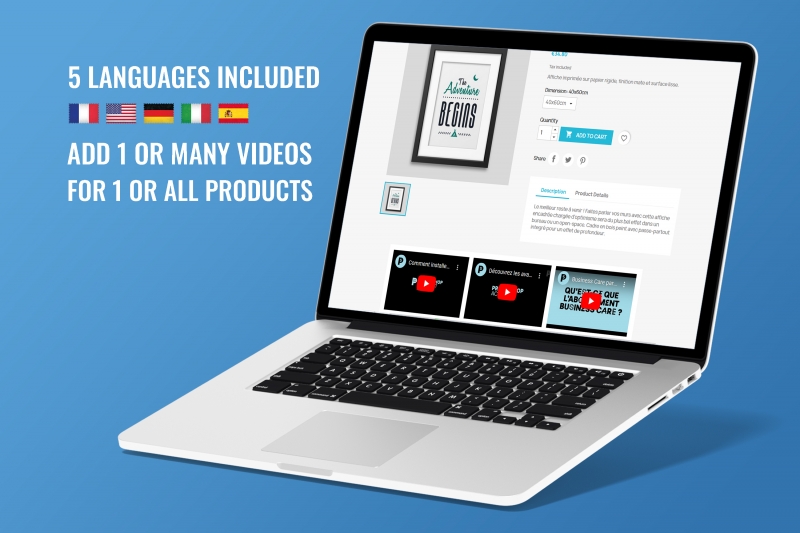
Add one or more videos to your product pages!
Compatible with Prestashop versions 1.7 to 9
It is translated (included) in 5 languages: FR+DE+EN+IT+ES
Installation steps are described in 5 languages in the module's user manual provided upon purchase.
The module settings include the following fields:
- option upload video MP4 ou bien Youtube / Dailymotion / Vimeo
- Option enabled (yes/no)
- Option to display the video section at the bottom of the product page
- Option to display video next to product images
- Option to display video on the product list page (instead of the main image)
- option icon play
- option auto-play
- etc.
Demo :
- Product page: https://demo-presta-8-1.ch/modules-demo/askforquote/en/art/4-the-adventure-begins-framed-poster.html
- Product list: https://demo-presta-8-1.ch/modules-demo/askforquote/en/9-art
Guide : https://demo-presta-8-1.ch/modules-demo/askforquote/videoonproductpage_readme_en.pdf
Video : https://www.youtube.com/watch?v=3B5Nej8y6hE

The primary users of a PrestaShop product video module are e-commerce merchants looking to enhance their visitors' experience and increase their conversion rates. This type of module is particularly popular with stores that offer products requiring visual demonstration, such as technology items, fashion, cosmetics, or sporting goods. Videos allow businesses to showcase products from different angles, in real-life situations, and reassure buyers about the product's quality.
E-commerce agencies, marketing specialists, and UX designers also use these modules to optimize their PrestaShop stores. They know that videos increase time spent on the page, improve product understanding, and reduce returns. Thanks to specialized PrestaShop modules, they can integrate YouTube, Vimeo, or MP4 videos directly into product pages without slowing down the site, providing a significant competitive advantage.
A good PrestaShop product video module should include advanced features to enhance the visual presentation of each product page. This includes the ability to add a video to a gallery, display a video in autoplay, as a popup, or as a background, and even replace the main image with a video. The more interactive and customizable options the module offers, the better it helps the merchant create an immersive presentation conducive to conversion.
The best PrestaShop extensions also include settings for responsive design, mobile compatibility, multilingual integration, and compression systems to prevent website overload. Some advanced versions even allow you to add multiple videos per product, optimize loading times, and improve SEO with structured video tags. These features offer a significant advantage over competitors using only static images.
A PrestaShop product video module can be integrated into various strategic locations within the store to maximize its impact. The most common location is the product page, usually replacing or complementing the main image. Videos placed prominently attract more attention and allow for a dynamic presentation of the product. Videos can also be placed within description blocks or in additional tabs.
Some e-commerce businesses prefer to integrate videos on the homepage, in sliders, or in promotional banners to strengthen their visual identity. It's also possible to add videos to category pages to showcase a collection or create a specific atmosphere. All these options improve the user experience, increase visit duration, and boost SEO through rich and engaging content.
Using a PrestaShop product video module is particularly effective for new collection launches or seasonal marketing campaigns. Videos allow you to present a product with emotion, movement, and detail, which is perfect for capturing visitors' attention during highly competitive periods such as Christmas, Black Friday, or winter sales. Brands can also use videos for product previews, pre-orders, and teasers.
Furthermore, when a retailer wants to showcase a technical or innovative product, videos are essential for explaining its operation, features, and benefits. During influencer or social media marketing campaigns, integrating videos into product pages strengthens consistency between content shared on social media and the online store. This increases trust, click-through rates, and overall conversion rates.
Installing a PrestaShop product video module is a simple process, accessible even to beginners. It generally involves downloading the module archive, importing it via the "Modules" tab in PrestaShop, and then activating it. Once activated, the e-commerce merchant can access the settings to customize options such as video placement, integration type, size, autoplay, mobile compatibility, and more. The intuitive interface allows adding a video in just a few clicks from a YouTube link or an MP4 file.
After installation, it's important to test the display on mobile, tablet, and desktop. Videos should be smooth, well-sized, and load quickly to optimize the user experience. A good setup can reduce bounce rates, improve navigation, and increase conversion rates. Adding a video to the product gallery also enhances product perception and eliminates potential doubts.
The price of a PrestaShop product video module varies depending on its level of sophistication, integrated features, and the technical support offered. Generally, basic modules can cost between €69 and €149, while professional modules range from €99 to €189. The most advanced versions, including multi-video support, popup videos, and SEO optimization, can reach €199 or more, depending on the license.
In addition to the initial cost, some developers offer paid upgrades, extended support, or premium versions with additional features. For a professional online store, investing in a robust video module is profitable because it significantly improves conversion rates. Videos help reduce product returns, reassure customers, and improve their understanding of the products being sold. This translates into quick financial gains for the business.
A PrestaShop product video module improves conversion rates because it provides an immersive and realistic dimension impossible to achieve with simple photos. Visitors can see the product in action, understand its actual size, how it works, and its practical uses. Videos increase the time spent on the product page, which improves SEO and the likelihood of purchase. In some sectors, conversions can increase by 20% to 80% thanks to video.
In addition to improving conversion rates, video boosts customer trust. Seeing a product in motion eliminates doubts, explains details that are difficult to describe, and reduces the risk of disappointment. Customers feel more confident in their choice, which reduces returns. Furthermore, a professional video strengthens brand image and gives a premium look to the PrestaShop store, sustainably improving the user experience.
Specialized PrestaShop developers, web agencies, and freelance module experts can create a custom video module. Shops with specific needs, such as interactive videos, 360° videos, influencer videos, or video carousels, can call upon certified developers. These professionals design custom modules compatible with all versions of PrestaShop and optimized for search engines.
Having a custom module developed is ideal for stores with a strong brand identity that want to stand out. The developer can integrate unique features, such as videos embedded in variations, automatic subtitles, or scripts to improve performance. This allows for the creation of a solution perfectly tailored to the store's marketing strategy and user experience, while guaranteeing the site's stability and speed.
The best PrestaShop product video modules can be found on the official PrestaShop Addons marketplace, which lists reliable, certified, and regularly updated extensions. They can also be found on specialized platforms like CodeCanyon, or directly on the websites of reputable independent developers. It is crucial to check compatibility with PrestaShop 1.7 and 8.x before purchasing to avoid technical issues.
It's also advisable to check user reviews, ratings, and the quality of the technical support offered. A well-rated module that is regularly updated and comes with clear documentation ensures a trouble-free installation. Professional online stores often choose modules that offer premium support, as this guarantees continuous service, quick bug fixes, and long-term compatibility with future PrestaShop versions.
It is recommended to update your PrestaShop product video module as soon as a new version is available, especially when it improves security, compatibility, or performance. Updates fix bugs, optimize video loading, and ensure seamless integration with the current version of PrestaShop. This is particularly important during a major CMS update, as older modules may stop working correctly.
Regularly updating the module also ensures an optimal user experience. A poorly loaded video, an incompatible player, or a display bug can harm conversion rates and the site's professional image. Updates often bring new options, improved mobile compatibility, and better SEO optimization. This guarantees site stability and improves the store's sales performance.

We are kind and respectful of the EU GDPR and the Swiss Data Protection Act. Will you have us?


Without any cookies, this site will not function. Some cookies are imperative for this site to function properly, such as add to cart or purchase.
If you haven't changed your mind and don't want any cookies, we'll say goodbye and redirect you to google.com, please click Here.
If you've changed your mind, please click Here.